Cloud provider guides
Care can be deployed on a range of cloud providers, with different deployment options depending on your scale, budget, and operational preferences. This section collects provider-specific recipes that walk you through standing up a production-ready Care environment step by step.
Before picking a provider, it helps to understand the infrastructure Care expects in production. The diagram below shows the core components of a production deployment.
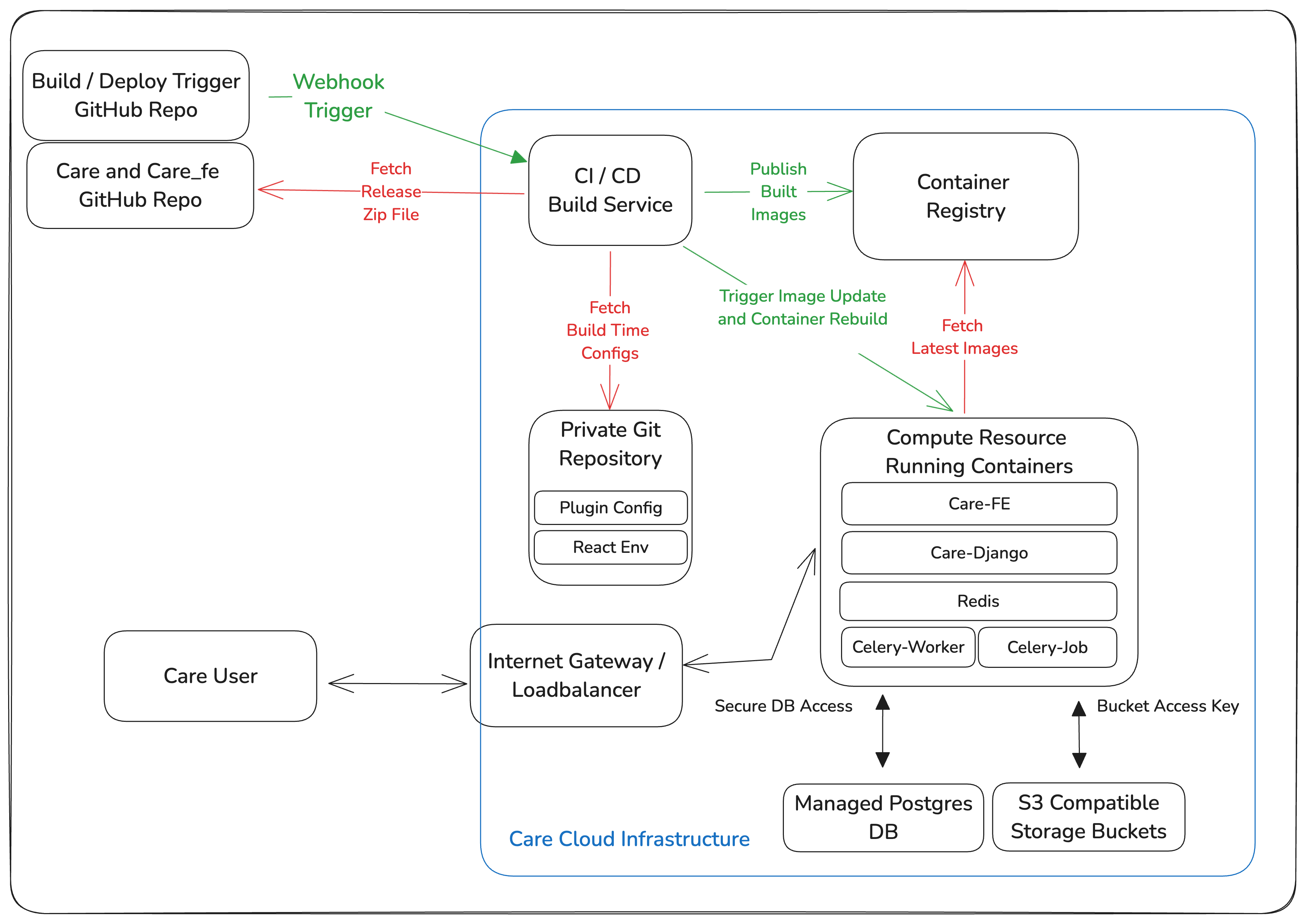
Infrastructure requirements
The following components are essential for a production deployment.
-
Compute resources
- High-availability Kubernetes cluster (if using container orchestration):
- Multi-master setup for fault tolerance and high availability across multiple availability zones.
- Worker nodes distributed across geographic locations for improved resilience and reduced latency.
- Custom Horizontal Pod Autoscalers (HPAs) based on CPU, memory, and custom application metrics.
- Cluster Autoscaler for dynamic adjustment of worker nodes based on workload demand.
- Support for Custom Resource Definitions (CRDs) for extended functionality and third-party integrations.
- Fine-grained Role-Based Access Control (RBAC) policies for proper access management and security.
- Strict security policies, including PodSecurityPolicies and Network Policies, to enforce container isolation.
- Advanced ingress controllers with header rewriting, path-based routing, and SSL termination for secure client connections.
- Virtual Private Server (VPS) options (AWS EC2, GCP Compute Engine, DigitalOcean Droplet, and similar):
- Customizable virtual machines with dedicated resources.
- A standard Linux distribution (x86 or ARM) such as Ubuntu or Debian, with Docker installed for containerization.
- Backup and snapshot capabilities for disaster recovery and point-in-time restoration.
- Platform as a Service (PaaS) options (DigitalOcean App Platform, Heroku, and similar):
- Simplified deployment workflows with built-in horizontal scaling to handle increased traffic.
- Integrated monitoring and logging for tracking performance and troubleshooting.
- Support for Python/Django and npm workloads alongside container images for flexible deployment.
- Environment variables and configuration management for application settings without code changes.
- Secure by default, with options for custom domains and SSL certificates for encrypted communication.
- High-availability Kubernetes cluster (if using container orchestration):
-
Database infrastructure
- Highly available PostgreSQL cluster with multiple read replicas for scalability and fault tolerance across regions.
- Support for data partitioning and sharding to distribute database load across nodes.
- Encryption of data at rest and in transit using robust key management for regulatory compliance.
- Automated backups for data consistency and reliability, with point-in-time recovery.
- Automated failover to minimize downtime during node failures or maintenance windows.
- Regular maintenance jobs (vacuuming, index rebuilding, statistics updates) for optimal performance.
- Monitoring to ensure consistency across replicas and detect replication lag.
- Procedures for version upgrades with minimal downtime using blue-green strategies.
- Auto-scaling policies for dynamic resource adjustment based on query volume and load patterns.
-
Storage solutions
- Highly available, scalable object storage with S3 API compatibility for universal access.
- Comprehensive data lifecycle management, including versioning, retention, and automatic deletion for cost optimization.
- Encryption for all stored objects, both at rest and in transit, to meet compliance requirements.
- Granular access controls using bucket policies, IAM roles, and access keys to prevent unauthorized access.
-
Network security
- Security groups for external communication with fine-grained rules for incoming and outgoing traffic.
- Firewall rules for managing traffic between application tiers.
- DDoS protection to safeguard against distributed denial-of-service attacks and ensure availability.
- Secure VPN service for reliable access to SSH and Kubernetes control planes with multi-factor authentication.
- Virtual Private Cloud (VPC) capabilities for isolated network environments with private subnets for sensitive components.
-
Email infrastructure
- Dedicated SMTP server to handle email traffic for the domain the cloud services run on.
- Proper email authentication (SPF, DKIM, and DMARC) to prevent spoofing.
- TLS encryption to protect email data in transit.
- Detailed logging and alerting for email traffic and server health to monitor delivery rates and detect issues.
-
CI/CD pipeline
- Image builds from release files with automated testing and validation.
- Automated deployment of images to the Kubernetes cluster with rollback capabilities.
- A highly available private container registry with build pipeline integration and vulnerability scanning.
- A private Git repository for infrastructure templates and configuration files, with access controls and audit logging.
Getting started
- Select a cloud provider from the guides below.
- Follow the provider-specific deployment guide.
- Deploy and configure Care according to the infrastructure requirements above.
Available cloud providers
| Cloud provider | Deployment guide | Available options |
|---|---|---|
| AWS | Deploy on AWS | ECS Fargate |
| Google Cloud | Deploy on Google Cloud | GKE, GCS |
| DigitalOcean | Deploy on DigitalOcean | App Platform |
If you want a portable, self-managed setup that is not tied to a single provider, see the Kubernetes reference deployment for an architecture you can run on any conformant cluster.